
How to Secure Your Crypto Wallet: Complete Beginner Guide 2026
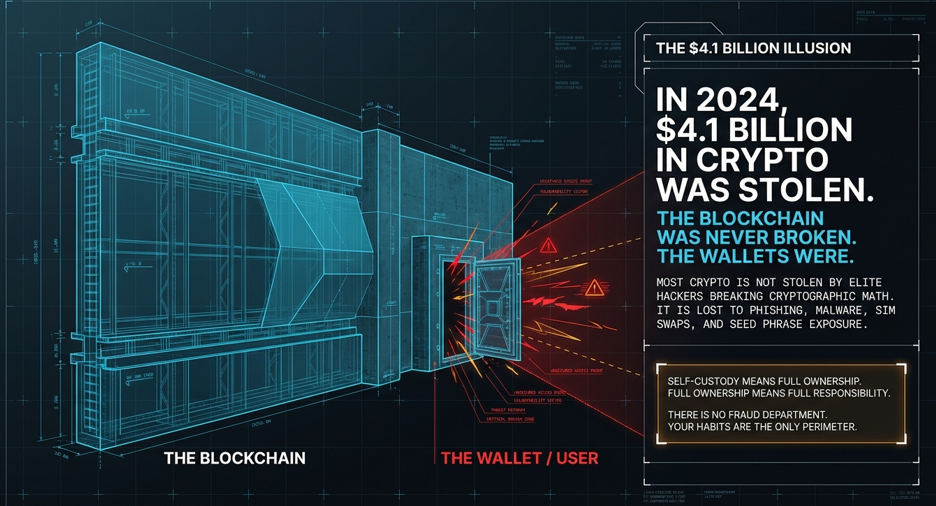
Most crypto is not stolen by hacking blockchains — it’s stolen because the wallet owner made one preventable mistake. In 2024 alone, $4.1 billion in crypto was stolen through phishing, malware, SIM swaps, and seed phrase exposure. The blockchain itself was never broken. The wallets were. This guide covers every practical step to secure your crypto wallet in 2026 — from setting it up safely to protecting against attacks most beginners have never heard of.
Quick Security Checklist: Do This Before You Hold Any Crypto
| Priority | Action | Takes |
|---|---|---|
| 🔴 Critical | Write seed phrase on paper — offline only | 5 min |
| 🔴 Critical | Never photograph or type seed phrase anywhere | Instant habit |
| 🔴 Critical | Send a $1 test before any large transfer | 2 min |
| 🔴 Critical | Enable authenticator app 2FA (not SMS) | 5 min |
| 🟡 Important | Move holdings above $500 to hardware wallet | 30 min |
| 🟡 Important | Verify wallet address character by character | 30 seconds per send |
| 🟡 Important | Store seed phrase backup in two separate locations | 10 min |
| 🟢 Advanced | Add passphrase (25th word) to hardware wallet | 15 min |
| 🟢 Advanced | Use metal seed phrase backup for fire/water protection | 20 min |
What Is a Crypto Wallet and Why Security Is Entirely Your Responsibility
Quick answer: A crypto wallet doesn’t store your coins — it stores your private key, which is the only proof of ownership. Whoever has your private key owns your crypto. There is no bank to call, no fraud department, no reversal. One mistake can mean permanent, total loss.
This is the most important thing to understand before anything else.
In traditional banking, if someone steals your password and empties your account, the bank investigates and usually returns the money. Crypto works completely differently. The blockchain doesn’t know who you are — it only knows who controls the private key. If an attacker gets your private key or seed phrase and moves your Bitcoin, that transaction is final. Irreversible. The blockchain confirmed it. No exchange, no regulator, no court can undo it.
That’s not a flaw — it’s the design. Self-custody means full ownership. But full ownership means full responsibility.
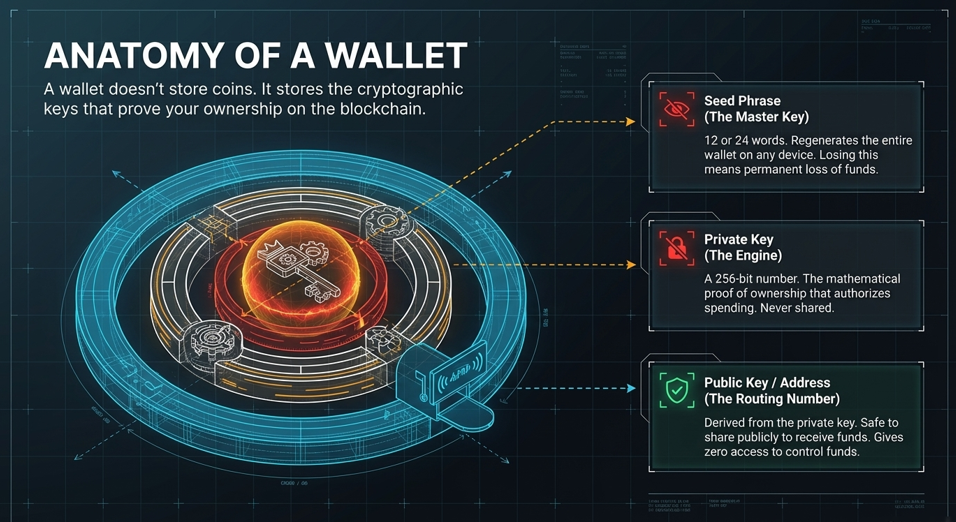
A crypto wallet has three components worth understanding:
Private Key — a 256-bit number (displayed as a long string of characters) that mathematically proves ownership of your funds. Think of it as a master password that also IS your money. Anyone who has it can spend everything in that wallet. Never share it. Never type it online. Never screenshot it.
Public Key / Wallet Address — derived from your private key, this is the address you share with others to receive funds. Like a bank account number — safe to share publicly. Giving someone your wallet address lets them send you crypto but gives them zero access to your funds.
Seed Phrase (Recovery Phrase) — typically 12 or 24 words generated when you create a wallet. This phrase can regenerate your entire wallet — including private keys — on any compatible device. It is the master key to everything. Losing it means losing access forever if your device breaks. Anyone who finds it can drain your wallet immediately.
Hot Wallet vs. Cold Wallet: Which One Should You Use?
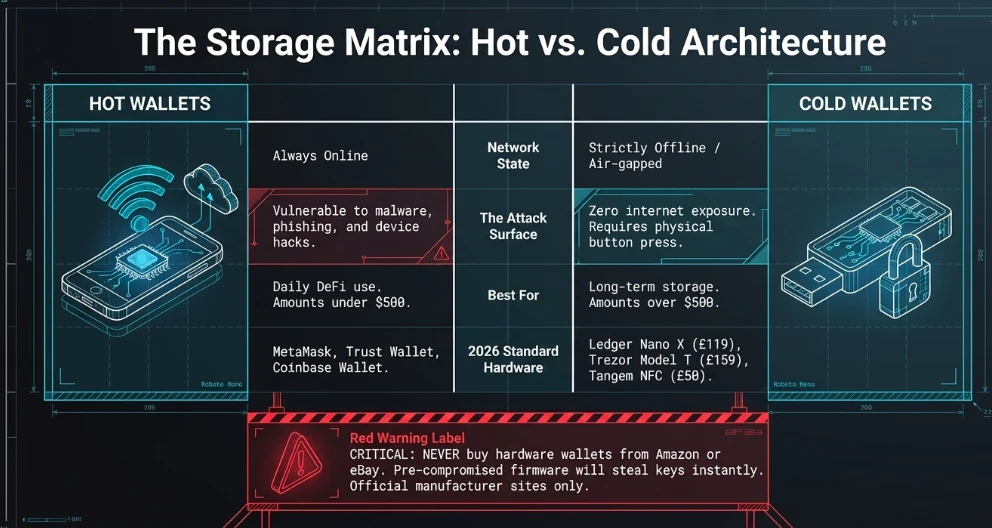
Quick answer: Use a hot wallet (software app) for small daily amounts only — under $500. Use a cold wallet (hardware device) for everything above that. The distinction is simple: hot wallets are connected to the internet, cold wallets are not. Internet connection is the attack surface.
Hot Wallets — What They Are and When to Use Them
A hot wallet is a software application — on your phone or computer — that stores your private key while connected to the internet. Examples: MetaMask (browser extension and mobile), Trust Wallet (mobile), Coinbase Wallet (mobile).
Hot wallets are convenient. You can send and receive in seconds. They support DeFi, NFTs, and dApps directly. But because your private key lives on an internet-connected device, it’s vulnerable to malware, phishing, and device compromise.
Use hot wallets for:
- Small amounts you need access to frequently (under $500)
- Active DeFi users making daily transactions
- Receiving payments you’ll move to cold storage shortly
Don’t use hot wallets for:
- Long-term storage of significant amounts
- Any amount you couldn’t afford to lose if your phone was hacked tomorrow
Cold Wallets — What They Are and When to Use Them
A cold wallet (also called a hardware wallet) is a physical device — looks like a USB drive — that stores your private key completely offline. It never connects to the internet directly. When you want to send crypto, you plug it in, verify the transaction on the device’s own screen, and physically press a button to confirm. The private key never leaves the device.
The two most trusted hardware wallets in 2026:
- Ledger Nano X — Bluetooth enabled, supports 5,500+ assets, costs £119/$149. Buy only from ledger.com directly.
- Trezor Model T — touchscreen, open-source firmware, costs £159/$179. Buy only from trezor.io directly.
A newer option: Tangem Wallet — a credit-card-sized NFC wallet with no seed phrase (backup via physical cards), CC EAL6+ secure chip. Setup takes 3 minutes. Best for beginners who find seed phrases overwhelming. Costs around £50/$55 for a 3-card set.
Critical warning: Never buy hardware wallets from Amazon third-party sellers, eBay, or any marketplace. Counterfeit and pre-compromised hardware wallets are sold this way — with modified firmware that steals your keys the moment you set up the device. Always buy directly from the manufacturer’s official website.
How to Set Up Your Wallet Safely: Step by Step
Quick answer: The setup process is where most beginners make their biggest security mistakes. The seed phrase generation and backup step is the most critical moment — and it must be done offline.
Step 1: Download from Official Sources Only
For software wallets: go directly to the official website — metamask.io, trustwallet.com. Don’t search “MetaMask download” in Google and click the first result — fake wallet sites appear in Google Ads regularly and look identical to the real thing. Type the URL directly.
For hardware wallets: download the companion app (Ledger Live or Trezor Suite) only from the official website. Not from app stores — malicious copycat apps have appeared there.
Step 2: Generate Your Seed Phrase — Do This Correctly
When you create a new wallet, it generates your seed phrase — 12 or 24 words in a specific order. This is the only moment these words are shown to you.
What to do:
- Write all words down on paper, in order, with the number next to each word
- Write it twice — on two separate pieces of paper
- Check your written copy against the screen word by word before clicking “continue”
- Store copies in two separate physical locations (home and another secure location)
What NOT to do:
- Don’t take a photo of the seed phrase with your phone — photos are backed up to iCloud or Google Photos automatically
- Don’t type it into any app, note-taking software, email, or messaging app
- Don’t store it in a password manager — password managers are online and hackable
- Don’t say it out loud if anyone else could hear
- Don’t write it on a sticky note on your monitor
What happens if you do it wrong: A single screenshot of your seed phrase uploaded to your cloud backup is accessible to anyone who breaches your Apple or Google account. Multiple cases in 2024 involved users whose cloud accounts were compromised and seed phrase photos were found and used to drain wallets.
Step 3: Verify the Seed Phrase Works Before Depositing Anything
Most hardware wallets ask you to verify the seed phrase immediately after writing it down — by re-entering the words in a scrambled order. Complete this step carefully. It confirms your written copy is correct.
For software wallets, you can test your backup by:
- Setting up the wallet fresh on a different device
- Choosing “restore existing wallet”
- Entering your seed phrase
- Confirming the same wallet address appears
Do this test before depositing any real funds.
Step 4: Set a Strong PIN or Password
Your hardware wallet PIN should be 6 to 8 digits — not 1234 or your birthday. After 3 wrong PIN attempts on a Ledger, the device wipes itself. After 10 wrong attempts on a Trezor, it wipes itself. This is the security feature — not a bug. Your seed phrase backup lets you restore the wallet on a new device.
For software wallets, use a password manager (Bitwarden — free and open source, or 1Password) to generate and store a 20+ character random password.https://thedawncrypto.com/best-solana-wallets-security-comparison-2026/
The Seed Phrase Backup Problem: Paper vs. Metal
Quick answer: Paper seed phrase backups are destroyed by fire, floods, and water damage. Metal backups survive house fires (steel melts at 1370°C, house fires peak at 650°C). For any holding above $1,000, a metal backup is worth the small cost.
This is the most practically useful security upgrade most people have never heard of — and competitors never explain it with specifics.
The paper problem: A standard house fire runs between 500°C and 650°C. Regular paper ignites at 233°C and turns to ash by 400°C. If your only seed phrase backup is on paper in your home and there’s a fire, your crypto is gone permanently. Same for flooding — paper deteriorates quickly in water.
Metal backup options:
- Cryptosteel Capsule (~£80/$90) — stainless steel capsule, each letter is a separate tile you arrange to spell your seed phrase. Waterproof, fireproof, corrosion-resistant. Supports any 12 or 24 word seed phrase.
- Bilodeau Cryptosteel or CRYPTOTAG Zeus (~£100/$110) — titanium plate, laser-engraved or stamped. Titanium melts at 1668°C — essentially indestructible in any realistic scenario.
- Simple alternative: Buy two 304-grade stainless steel washers from a hardware store, use a metal stamp set (~£20/$25), and stamp the first 4 letters of each seed word (4 letters is enough to identify any BIP-39 word uniquely). Store in a waterproof container. Total cost under £50.
What NOT to do: Don’t engrave your seed phrase on something identifiable as a seed phrase backup (like a product with “CRYPTO BACKUP” written on it). If someone finds it, they know exactly what it is. Plain steel with stamped letters looks like nothing to someone who doesn’t know what they’re looking at.
Attacks That Steal Crypto Without Hacking the Blockchain
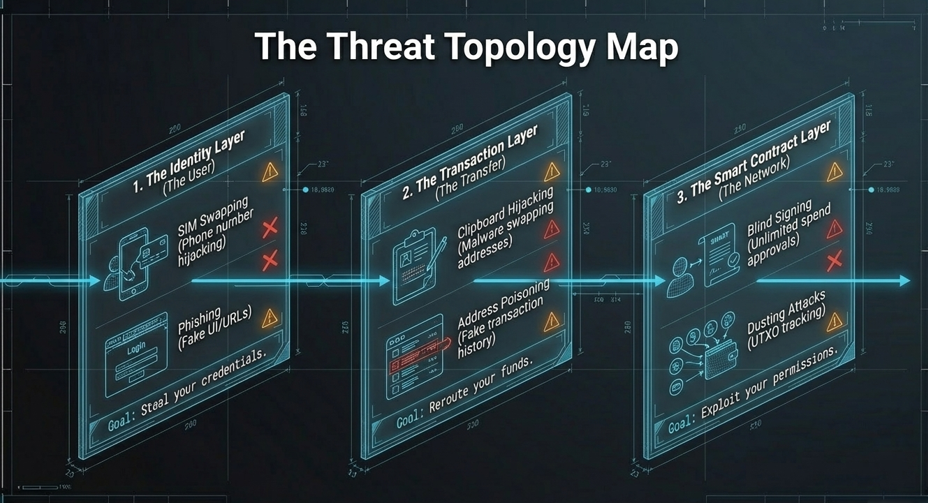
These are the attacks most beginners never hear about until they’ve lost money.
1. Clipboard Hijacking — The Attack That Happens in Milliseconds
What it is: Malware silently monitors your clipboard. The moment you copy a wallet address to paste it into a transaction, the malware replaces it with the attacker’s address — in under a millisecond. You paste what looks like the right address. You send. The crypto goes to the attacker.
How to prevent it:
- Always verify the first 4 and last 6 characters of a pasted address against the original
- Better: type or scan the recipient address rather than pasting where possible
- Use the Ledger Live or Trezor Suite app’s built-in address book — these apps re-verify addresses before sending
The $1 test rule: Before sending any significant amount to a new address, send $1 or the minimum transaction amount first. Confirm it arrives. Then send the full amount. This single habit has saved countless people from clipboard hijacking and typo losses. The small test fee is worth it every time.
2. Address Poisoning — The Attack That Exploits Your Transaction History
What it is: An attacker sends you a tiny, worthless amount of crypto (sometimes $0.00001) from a wallet address that looks almost identical to one you’ve sent money to before. The first and last few characters match. The middle is different — but nobody checks the middle.
The goal: when you next want to send to your regular address, you open your transaction history, see the familiar-looking address, copy it — and send to the attacker.
Example: Your regular ETH address ends in …7f3a. The attacker creates an address ending in …7f3a with a similar beginning. They send you dust. Your history now shows two transactions with nearly identical addresses. You copy the wrong one.
How to prevent it:
- Never copy addresses from your transaction history
- Always copy from the original source — the exchange, the official website, your address book
- Verify every character of high-value sends
- Use ENS names (Ethereum Name Service) or wallet address books for frequent recipients instead of raw addresses
3. SIM Swap — How Attackers Take Over Your Phone Number
What it is: An attacker calls your mobile carrier, impersonates you, and convinces them to transfer your phone number to a new SIM they control. Once they have your number, they receive all your SMS messages — including 2FA codes. They then reset your exchange password using “forgot password” + SMS verification and clean out your account.
This attack doesn’t require hacking your phone. It requires one phone call to your carrier’s customer service.
Real numbers: The FTC reported over $68 million in SIM swap losses in 2023. The real number is higher because most cases go unreported.
How to prevent it:
- Never use SMS (text message) for 2FA on any crypto account — ever
- Use an authenticator app instead: Google Authenticator, Authy, or Aegis (Android, open source)
- Best protection: YubiKey — a physical USB security key. Even if someone has your password and phone number, they can’t log in without the physical YubiKey in their hand
- Call your mobile carrier and request a “SIM lock” or “port freeze” — this requires a PIN or in-person visit before any SIM transfer can happen
What NOT to do: Don’t use the same phone number for crypto 2FA that’s linked to your exchange account email. Attackers chain these: SIM swap → email reset → exchange account takeover.
4. Phishing — Fake Websites That Look Real
What it is: You receive an email, a Discord message, or a Google Ad leading to a website that looks identical to MetaMask, Coinbase, or Ledger Live. The site asks for your seed phrase to “verify your wallet” or “restore access.” The moment you enter it, the attacker drains your wallet automatically.
Legitimate wallets and exchanges never ask for your seed phrase. Never. Not for verification. Not for support. Not for updates. Not for any reason.
How to prevent it:
- Bookmark official URLs directly — never click email links to crypto sites
- Use a password manager — it won’t auto-fill on a fake site because the URL doesn’t match
- Enable phishing protection in your browser (Chrome and Firefox both have this built in)
- Check the URL character by character — fake sites use l (lowercase L) instead of I, or rn instead of m
5. Dusting Attack — How Attackers Track Your Wallet
What it is: An attacker sends tiny amounts of crypto (called “dust” — sometimes $0.001 or less) to thousands of wallet addresses. If you spend that dust by including it in a future transaction, blockchain analysis can link your wallet to other wallets you control — building a profile of your holdings.
Dust attacks don’t steal your crypto directly. They reveal your holdings and wallet connections, enabling targeted phishing or physical attacks.
How to prevent it:
- In Trust Wallet and MetaMask, you can freeze or ignore dust tokens without spending them
- In Ledger Live, use “coin control” to exclude tiny UTXOs from transactions
- If you receive unexpected tiny token amounts from unknown sources, don’t interact with them — don’t approve them, don’t sell them, don’t move them.https://thedawncrypto.com/fix-solana-alpenglow-errors/
6. Blind Signing — Approving Transactions Without Knowing What You’re Approving
What it is: When you connect your wallet to a DeFi app or NFT marketplace and click “Approve,” you’re signing a smart contract interaction. Most wallets display this as a hex code — meaningless to humans. You’re approving something, but you can’t read what.
Attackers build malicious smart contracts that ask for “unlimited approval” to spend all tokens in your wallet. If you approve a malicious contract, the attacker can drain your entire wallet — even tokens you didn’t intend to interact with.
How to prevent it:
- Use Revoke.cash (free website) to review and revoke all token approvals you’ve given. Check this monthly if you use DeFi
- Ledger’s hardware wallet now has “Clear Signing” — it translates smart contract data into readable text before you approve. Enable this in Ledger Live settings
- Never approve “unlimited” token permissions on any unfamiliar site
- If a site is asking you to approve spending and you didn’t initiate a transaction, close it immediately
Two-Factor Authentication: What to Use and What to Avoid
Quick answer: Use an authenticator app (Google Authenticator, Authy, or Aegis) as your minimum. Use a YubiKey hardware token for maximum security. Never use SMS 2FA for anything crypto-related.
Here’s the security ranking from weakest to strongest:
| 2FA Method | Security Level | Why |
|---|---|---|
| No 2FA | ❌ None | Password alone is one breach away |
| SMS / Text message | ⚠️ Weak | SIM swappable by a phone call |
| Email 2FA | ⚠️ Weak | Email accounts are compromised regularly |
| Authenticator app (TOTP) | ✅ Strong | Generates time-based codes on your device only |
| YubiKey hardware token | ✅✅ Strongest | Physical key required — cannot be SIM swapped |
Setting up Google Authenticator correctly:
- Download Google Authenticator from the official app store
- In your exchange settings, find “Security” → “2FA” → “Authenticator App”
- Scan the QR code with Google Authenticator
- The app generates a new 6-digit code every 30 seconds
- Critical: When setting up, write down the backup codes the exchange provides — these let you access your account if you lose your phone
What NOT to do: Don’t store your authenticator app backup codes in your phone’s notes app or photos. If your phone is compromised, so are your backup codes. Print them and store with your seed phrase backup.
The Passphrase (25th Word): Advanced Protection Most Beginners Never Use
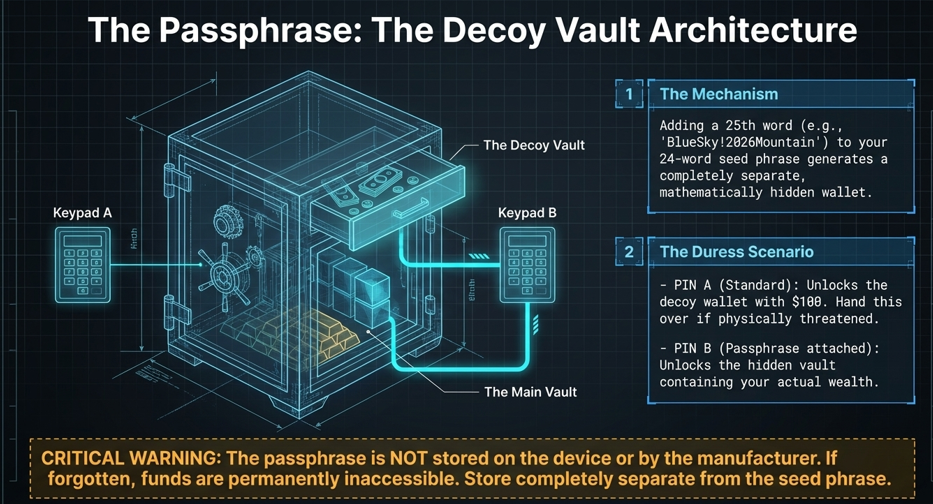
Quick answer: A passphrase adds a secret word (or phrase) to your seed phrase, creating a completely separate hidden wallet. Even if someone finds your 24 seed words, they still can’t access your funds without the passphrase. Supported by Ledger and Trezor hardware wallets.
This is the most underused security feature in crypto — and one of the most powerful.
Here’s how it works: Your standard 24-word seed phrase generates a specific wallet. Add a passphrase (any word, phrase, or combination of characters — like “BlueSky!2026Mountain”) and it generates a completely different wallet. Same seed phrase, different passphrase = completely different address, completely different funds.
The duress scenario: Imagine someone physically forces you to reveal your seed phrase. If you use a passphrase, you can reveal the seed phrase — it will show a real wallet with a small amount of crypto (your “decoy” wallet). Your real holdings are in the passphrase-protected wallet, which they don’t know exists.
How to enable on Ledger:
- Open Ledger Live → Settings → Security
- Select “Add passphrase”
- Choose “Attach to PIN” (recommended) — your regular PIN opens the decoy wallet, a secondary PIN opens the passphrase-protected wallet
Critical warning: The passphrase is NOT stored anywhere — not on the device, not by Ledger, not anywhere. If you forget it, your funds in that wallet are permanently inaccessible. Write it down and store it separately from your seed phrase — never in the same location.
How to Store Your Seed Phrase: The Right Locations
Most guides say “store it safely” without explaining what that means. Here is specific guidance.
Two-location rule: Store your seed phrase backup in two separate physical locations. If one is destroyed (fire, flood, theft), the other survives. Common setups:
- Location 1: Home safe (fireproof preferred) or a lockbox
- Location 2: Bank safe deposit box, trusted family member’s secure location, or a second property
What NOT to store it near:
- Don’t store seed phrase and hardware wallet together — if someone finds both, they have everything
- Don’t store seed phrase with documents that identify you — if a burglar finds your passport and seed phrase together, they know exactly what the words are for
The inheritance problem: What happens to your crypto when you die? If your seed phrase is hidden and nobody knows where it is, your crypto is lost forever. Consider a “crypto inheritance letter” — a sealed letter in a trusted lawyer’s care or a safety deposit box, explaining what you hold, where the seed phrase is, and how to access it. Only to be opened after your death.https://thedawncrypto.com/how-to-recover-stolen-cryptocurrency/
Security Habits to Build From Day One
Before every transaction:
- Send a $1 test first for any new recipient address
- Verify the first 4 and last 6 characters of the recipient address after pasting
- Check the network matches — sending USDT on Tron to an Ethereum address is permanent loss
Monthly habits:
- Visit revoke.cash and check your token approvals — revoke anything you don’t recognise
- Check if your email appears in data breaches at haveibeenpwned.com
- Update your hardware wallet firmware from within Ledger Live or Trezor Suite — never from external prompts
Every 6 months:
- Test your seed phrase recovery — restore to a secondary device and confirm your wallet address appears correctly
- Review all 2FA setups — ensure backup codes are still stored securely
- Check that your metal/paper seed backups are intact and readable
What to Do If You Think Your Wallet Has Been Compromised
Quick answer: Act within the first few minutes. Move all remaining funds immediately to a new wallet you created on a clean device. Every second you wait is time the attacker has to drain more.
If you suspect compromise — you see unexpected transactions, your wallet shows a different balance, or you think you’ve entered your seed phrase somewhere — follow these steps immediately:
Step 1: On a different, clean device (not the compromised one), download a wallet app and create a brand new wallet. Write down the new seed phrase.
Step 2: From your exchange or any remaining safe balance, send everything to the new wallet address. Prioritise the highest-value assets first.
Step 3: For tokens with approval permissions, revoke them at revoke.cash — but only from the new, clean device.
Step 4: Do NOT use the compromised device for crypto activity again. Factory reset it or replace it.
Step 5: Change all passwords associated with your exchange accounts from a clean device. Enable authenticator app 2FA if you weren’t using it already.
What NOT to do: Don’t send funds back to the same wallet after a “cleanup.” If your seed phrase is compromised, that wallet is permanently unsafe. Any funds you send back can be drained again immediately.https://thedawncrypto.com/crypto-risk-management-checklist-beginners/
The Real Reason Most People Lose Crypto
It’s not hackers breaking blockchains. It’s not exchanges going bankrupt. The number one cause of crypto loss is human error combined with preventable security gaps.
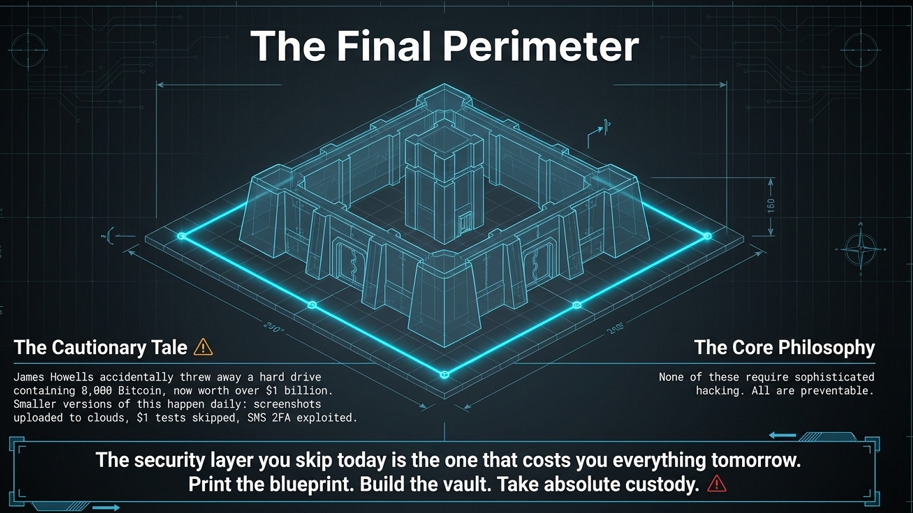
The James Howells story — the British man who accidentally threw away a hard drive containing 8,000 Bitcoin now worth over $1 billion — is the most famous example. But smaller versions of that story happen thousands of times a year. Seed phrases photographed and uploaded to cloud storage. Transactions sent to the wrong address without a $1 test first. SMS 2FA bypassed by a SIM swap. Token approvals given to malicious contracts without checking.
None of these require sophisticated hacking. All of them are preventable with the habits in this guide.
Start with the basics — write your seed phrase on paper, offline, in two locations. Enable authenticator app 2FA on every account. Send a $1 test before every significant transfer. Add a hardware wallet once you hold more than $500.
Build from there. The security layer you don’t set up today is the one that costs you everything tomorrow.
This article is for educational purposes only. It does not constitute financial or security advice. Always verify current guidance from your specific wallet provider’s official documentation. Crypto security practices evolve as threats evolve — stay informed.


![How to Build a Crypto Risk Management Checklist for Beginners [2025]](https://thedawncrypto.com/wp-content/uploads/2026/03/Crypto-Risk-Management-Checklist-for-Beginners-660x470.webp)